Gallery - Photo Gallery, Album
- 4.6
- Rating
- 1.00M
- Installs
- Free
- Price

 Analysis by App-foxy
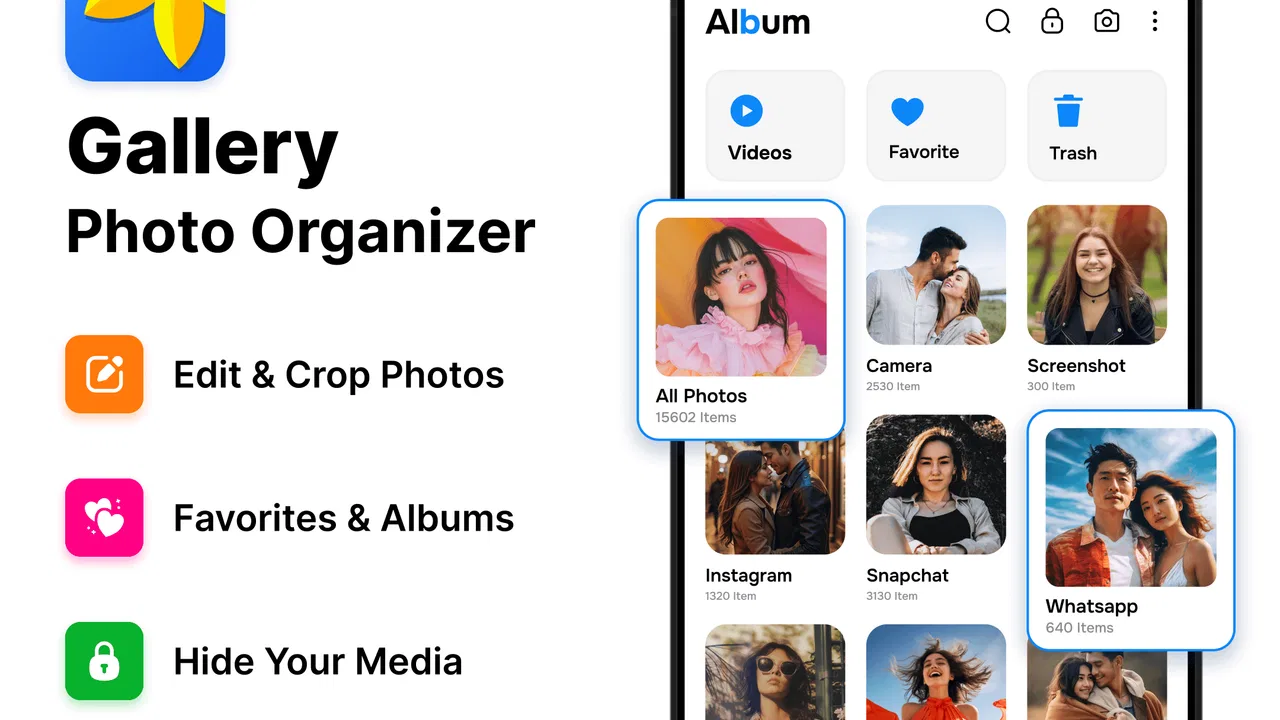
When a phone is used by more than one person, the photo gallery quickly becomes a shared drawer: holiday pictures sit beside school projects, screenshots, downloaded images, and short videos. I tested Gallery - Photo Gallery, Album with that kind of everyday mess in mind, and I found its main value in making a crowded camera roll easier to browse without turning photo management into a project. It is a free photography app from Rivers AppSolution, aimed at people who want a clearer place to view, organize, manage, and edit their images and videos.
The first thing I noticed is that this is not really a social photo service or a cloud-sharing platform. It works as a practical gallery for the media already on your device. That distinction matters in a household. If several people use one phone, or if one person regularly hands the phone to relatives, the app can make browsing more comfortable, but it does not replace separate user accounts, private cloud libraries, or a dedicated family-sharing system. I would recommend it as a local gallery tool, not as a complete solution for separating everyone’s digital lives.
How it feels on a shared household phone
A realistic example is a family tablet or an older phone kept in the living room. One person takes pictures during a weekend trip, another saves recipes, and someone else records a school performance. The default gallery can become difficult to scan because every kind of media appears together. In this situation, the app is useful because it gives the collection a more deliberate, album-oriented feel. I could approach the library by purpose instead of endlessly scrolling through one long stream.
You May Also Like

 Blood Strike: 2.5 Anniversary
Blood Strike’s Loadouts Turn Every Drop Into a Tactical Gamble
A close look at Blood Strike’s custom loadouts: how fast access to signature weapons reshapes its battle royale rhythm, rewards preparation, and narrows the gap between fights.

 Pandora - Music & Podcasts
Pandora’s Music Is Easy to Start, but Harder to Recover
Pandora’s strength is its low-effort path from a seed to a station. Its weak spot is how much confidence it asks you to place in connection, setup, and quiet recovery.

 8 Ball Pool
 Is Built on Rivalries, Rematches, and Routine
A close look at the rivalries, rematches, shared routines, and unanswered safety questions that turn a quick pool match into a persistent mobile community.

 Samsung Music
’s Quiet Strength Is Playing What You Already Own
Its reach comes less from spectacle than from dependable access to a personal library. That simplicity is both the app’s strongest retention engine and its ceiling.

 AccuWeather: Weather Radar
AccuWeather Review: A Quick, Clear Forecast for Everyday Decisions
For everyday plans, the best forecast is the one you can understand quickly. AccuWeather makes rain timing, radar, and local conditions easy to act on, with a few trade-offs.

 Hill Climb Racing
Why Hill Climb Racing Still Turns Crashes Into One More Run
A tiny car, a bumpy hill and one more upgrade: Hill Climb Racing keeps resurfacing because its simple chaos makes every near-miss feel personal.
More From Our News Desk
View All News


That change sounds small, but it affects how quickly another person can find something. A parent looking for a recent video, a child wanting to show a drawing, or a guest browsing holiday photos all benefit from a gallery that feels less chaotic. The app’s strongest household role is therefore coordination: it helps people agree on where pictures belong and how to find them later.
I would still set expectations before installing it on a shared device. A gallery app can display and organize local media, but it should not be treated as a privacy boundary by itself. If the same device is unlocked and the app can show the phone’s pictures, anyone with access to that device may encounter images belonging to someone else. For personal photos, work documents, or sensitive screenshots, I would keep the phone protected and avoid assuming that an album name makes content private.
This is also why I would not install it casually on a device that children use without supervision. The app has an Everyone content rating, which makes it suitable in age terms for a broad audience, but an age rating is not the same thing as a private-space guarantee. The pictures stored on the phone still determine what someone may see. The responsible setup is to review the existing media first, remove material that should not be shared, and decide who is allowed to handle the device.
Starting with a clean arrangement
My preferred setup is to begin with a small cleanup rather than importing the entire history mentally at once. I would first identify the main groups that matter in the household: personal memories, school or work material, travel, receipts, and temporary downloads. The point is not to create dozens of albums. Too many categories make a gallery just as confusing as one unfiltered feed.
A practical arrangement uses broad labels that everyone understands. “Trips” is more useful than a complicated naming system that only one person remembers. “To print” or “Important documents” can also be helpful, although I would be careful with document images because a gallery is not automatically a secure filing cabinet. The app can help me find and manage visual files, but I would not rely on it as the only place for records that need stronger protection or backup.
One non-obvious benefit of this approach is that it exposes the difference between storage and organization. Moving a photo into a more convenient album does not necessarily create another copy or protect the original. I would avoid repeatedly duplicating files just to make them appear in several places. Duplicates can make a shared phone feel full and can leave several versions of the same image, which later creates uncertainty about which one is the final edit.
Before handing the phone to another person, I would also check the recent-media area. Screenshots and downloaded pictures are often more revealing than camera photos because they may contain messages, delivery details, booking information, or unfinished work. This is one of the most useful household habits I took from using the app: organize for the next person who will open the gallery, not only for the person who created the files.
Editing without losing track of originals
The editing tools make the app more than a simple viewer, and I found them useful for quick corrections rather than serious image production. If I want to improve a picture before showing it to someone, having viewing, management, and editing in one place is convenient. I do not need to jump between a gallery and a separate editor for a basic touch-up.
My advice is to treat editing as a decision point. For a family photo, I might make a quick adjustment and then compare the result with the original before sharing it. For a document photo, I would be much more cautious: cropping away an edge or changing the appearance too aggressively can remove information that another person needs. The convenience of an integrated editor can encourage fast changes, so I would keep the unedited version until I am certain the result is suitable.
This is also where the app may not satisfy enthusiasts. People who need layered edits, detailed retouching, advanced color control, or a carefully managed professional workflow will probably prefer a dedicated photo editor. The gallery’s advantage is speed and proximity to the library, not replacing specialist software. I see it as the tool I open when the image needs to be made presentable, not when I want to spend time producing a finished creative project.
Coordinating photos between people
Shared devices create a small but real coordination problem: everyone needs to know what has already been sorted. I found that a simple routine works better than trying to organize everything immediately. After an event, one person can review the new images, remove obvious clutter, and place the useful pictures into a broad album. Later, another person can edit favorites or separate private material. This avoids several people making inconsistent decisions at the same time.
The app is particularly helpful when the device is used as a display library. A relative can browse an album of a birthday or trip without searching through unrelated screenshots. A child can find artwork more easily if it is kept with other school images. Someone preparing a presentation can locate pictures faster when temporary downloads are not mixed with personal memories.
There is a trade-off, though. Shared organization only works when the people using the phone follow the same habits. If one person creates an album for every small occasion while another leaves everything in the general view, the library will slowly split into two systems. I would keep the rules visible and simple: use albums for recurring groups, leave one-off images in the main collection, and review clutter after large events.
I would also avoid assuming that an album is a collaboration space. The app is useful for arranging media on the device, but household members should not expect it to provide the same coordination features as a dedicated cloud service or messaging platform. If several people need to add photos from their own phones, a shared online album may be a better fit. This app makes more sense when the media already lives on one Android device and the main problem is finding it.
Age, trust, and personal boundaries
The Everyone rating is reassuring for ordinary family use, but the more important question is who can access the phone. A gallery can contain pictures from every part of a person’s life, including images that are harmless but still personal. I would explain to younger users that browsing is fine only when the device owner agrees, and I would avoid presenting the app as a place where private pictures are automatically hidden.
For adults sharing a device, trust matters just as much. A partner, roommate, or family member may be comfortable with shared holiday albums but not with personal screenshots or work material. I would separate those expectations before using the phone as a common photo display. If the device cannot provide a reliable boundary between users, the safer choice is to keep sensitive images on a personal device or in a service designed around individual accounts.
This is one reason I appreciate the app more as an organizer than as a privacy product. Its purpose is clear when I want to view and manage photos and videos efficiently. Problems begin when someone expects the gallery itself to decide who should see each image. That decision still belongs to the device owner and the household’s access rules.
Compatibility is fairly broad: the app runs on Android 8.0 and later. That makes it a practical candidate for an older household phone that may not support the newest gallery experiences. I would still check how the device handles storage and performance in daily use, especially if it contains a large media history. A gallery can feel fast with a modest collection and less comfortable when the phone is overloaded with years of video.
What the adoption numbers suggest, and what they do not
The app has reached over a million installs and holds a 4.6 average from around forty-two thousand ratings. Those figures suggest that it has found a substantial audience among people looking for a straightforward photo gallery. They do not change my practical advice: popularity can support confidence in trying it, but the right choice still depends on whether you need local organization or a broader photo ecosystem.
It is free, which lowers the risk of testing it on a spare phone or a shared family device. I like that I can evaluate the workflow without first committing money, particularly when the goal is simply to replace an awkward default viewer. The current version is 3.7, and the app was released on January 1, 2025, so I would keep it updated through the normal app-store process rather than relying on an old installation indefinitely.
The developer, Rivers AppSolution, has positioned the product around the everyday gallery problem rather than a specialized photography niche. In my use, that focus is a strength. I did not feel pushed into a complicated cataloging system before I could see my pictures. The weakness is the same focus: users who want deep cloud integration, advanced editing, or strict multi-account separation may find the app too limited for their main workflow.
When another option is the better choice
I would choose a standard cloud photo service instead when the household’s main need is automatic access from several phones. That type of service is better for people who regularly capture pictures on separate devices and want everyone to see the same collection. It can also be more suitable when backup and remote access matter more than local browsing.
I would choose the phone manufacturer’s gallery when it already handles the device’s folders, backups, and sharing exactly as I need. Switching galleries has a cost: I must learn a new layout, decide how albums should be arranged, and make sure everyone using the device understands the difference. The app earns its place when its cleaner organization and integrated editing are more helpful than the familiarity of the default option.
For serious photography, I would use a dedicated editor alongside it. A photographer who needs precise adjustments or a repeatable production process should not expect a general gallery to provide the same control. The app is best for reviewing, sorting, and making quick improvements, especially when the final goal is showing a picture to another person rather than preparing it for professional delivery.
For private household records, I would use protected storage instead. Photos of identity documents, financial paperwork, or personal conversations deserve a workflow built around access control and backup. A gallery helps me locate those files, but convenience should not be confused with security. This distinction is especially important on a shared phone.
My household verdict
After using it as a local photo organizer, I think Gallery - Photo Gallery, Album is a sensible free choice for people who want a less cluttered way to browse and manage media on an Android device. Its strongest scenario is a phone or tablet where photos, videos, screenshots, and downloads need a clearer arrangement for everyday use. The built-in editing makes quick corrections convenient, while the broad Android compatibility makes it suitable for older devices as well.
I would recommend it to a household that can agree on simple album habits and understands that organization is not the same as privacy. It works well for holiday collections, children’s artwork, shared event photos, and a device used as a family memory library. I would not recommend making it the sole home for sensitive material, nor would I choose it as the main tool for a multi-phone family that needs synchronized accounts and automatic backup.
My most useful tip is to treat the first setup as a boundary-setting exercise. Decide which pictures are genuinely shared, keep private media on a personal device, and use a few meaningful albums instead of reproducing every folder. Once those expectations are clear, the app does what I want from a gallery: it helps people find the right photo quickly, edit it when necessary, and hand the device to someone else without forcing them through an endless, disorganized camera roll.
For that focused purpose, it is easy to recommend. The app does not need to become the center of a family’s digital life; it only needs to make the pictures already on one device easier to live with. That modest role is also its clearest advantage.
FAQs for Gallery - Photo Gallery, Album
01What features does the Gallery - Photo Gallery, Album app offer?
The Gallery app provides a comprehensive suite of features for organizing, viewing, and managing photos and videos. Users can create albums, tag photos, and use the app's intuitive interface to navigate their media. It also supports various image formats, slideshows, and offers basic editing tools like cropping and filters.
02Is my data safe when using the Gallery app?
Yes, the Gallery app prioritizes user privacy and data security. It offers robust encryption for your photos and videos, ensuring that your media is secure and accessible only to you. Additionally, the app does not share your data with third parties without your consent, adhering to strict privacy policies.
03Can I back up my photos using the Gallery app?
Yes, the Gallery app includes a backup feature that allows users to safely store their photos and videos. You can choose to back up your media to cloud services or external storage devices, ensuring that your memories are preserved even if your device is lost or damaged.
04Does the Gallery app support photo editing?
The Gallery app includes basic photo editing tools that allow users to enhance their images. You can adjust brightness, contrast, and saturation, as well as apply filters and crop images. While it doesn’t replace professional editing software, it’s sufficient for quick and simple edits.
05Is the Gallery app compatible with all devices?
The Gallery app is designed to be compatible with both Android and iOS devices, covering a wide range of smartphones and tablets. It supports various screen sizes and resolutions, ensuring a seamless experience across different devices. Regular updates help maintain compatibility with the latest operating systems.
Pros
- User-friendly interface enhances navigation.
- Fast photo loading and smooth scrolling.
- Customizable album organization options.
- Supports various photo formats seamlessly.
- Secure with built-in privacy settings.
Cons
- Limited cloud storage integration options.
- Occasional ads can be intrusive.
- No advanced photo editing features.
- Requires frequent updates for best performance.
- Offline access can be glitchy at times.

Gallery - Photo Gallery, Album
Gallery